
 Deutsch (Deutschland)
 Polski (PL)

The Project Scope Statement (IDK-02) says what the project delivers: benefits, processes, exclusions and acceptance criteria. In Implementer each of these is a register row with its own lifecycle. The scope statement is a view of those rows, and the steering group signs it by approving a project scope baseline.
What you get in the application
Scope in the project menu has five tabs: Statement, Changes since sign-off, Benefits, Exclusions and Acceptance criteria.
- Benefits (
B-nn): measurable (measure, baseline value, target, date, owner) or intention (objective only). - Process areas (
PA-nn) with a short code and a process owner, and in-scope processes (SP-nnn) with sites, owner, fit to the standard (fits, partly fits, does not fit) and linked CRIMs. - Exclusions (
OOS-nnn): a reason, where the matter is handled instead, and a responsible person. - Acceptance criteria (
AC-nnn): criterion, proof, accepting role, group (product delivery or project delivery) and the processes covered. - Interface scope is a field on each interface (new, kept unchanged, retiring).
Every row goes from proposed to agreed. Agreed content is frozen until someone uses Reopen for changes.
How to use it
- Add benefits, areas, processes, exclusions and criteria on their tabs. Project managers agree rows. The executive sponsor also agrees benefits. Other roles prepare drafts.
- Open the Statement tab. It lists what blocks sign-off: rows still proposed, no agreed benefit, no in-scope process, a process without an agreed criterion, or a criterion whose accepting role nobody holds.
- Fix each blocker. The tab then reads "Ready to sign: no blocking gaps".
- Choose Prepare scope baseline. The steering group approves it as a baseline of the kind project scope. That approval is the signature.
- After sign-off, a criterion is accepted with Accept, an evidence description and a date. Only a user who holds the accepting role named in the criterion can do it. A project manager cannot accept for another role.
- After sign-off, open Changes since sign-off. Each added, removed, revised or reopened row shows whether an approved change request explains it. Use Set change request to name one.
- For the document, go to Documents, create "Project scope statement", write the narrative sections, generate a version and submit it.
Screenshots
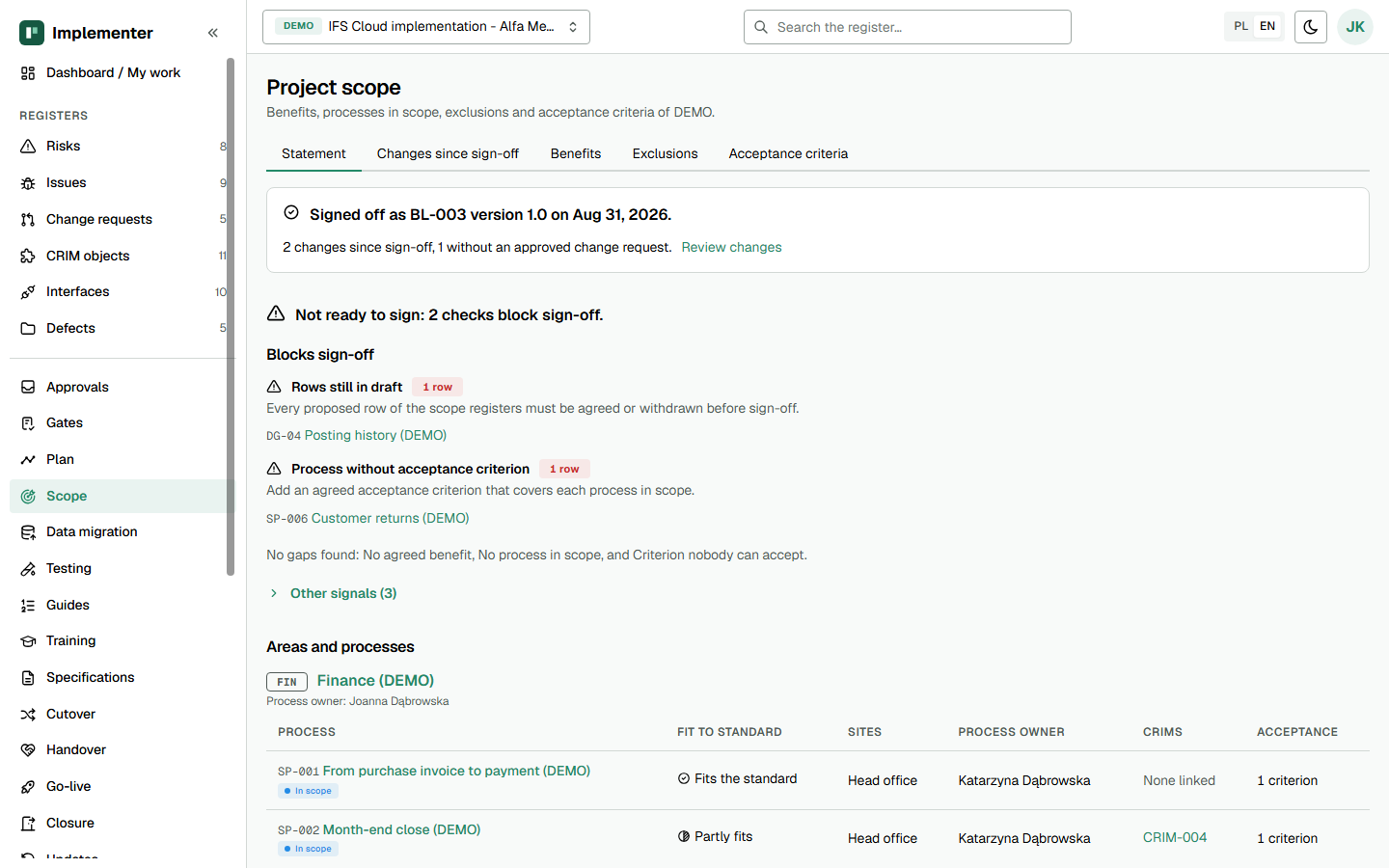
The Statement tab shows the sign-off line with changes since sign-off, two blocking checks and the areas with their processes. Demo data.
How it maps to the template
| Template section | Implementer |
|---|---|
| Purpose and background | Narrative "Objective and background" |
| Objectives and benefits | Benefits tab |
| Software scope | Narrative "Software in scope" (no register) |
| Solution scope by process area | Process areas and in-scope processes, CRIM links |
| Data and interface scope | Data groups (see IDK-14); interface scope field |
| Out of scope | Exclusions tab |
| Acceptance criteria | Acceptance criteria tab |
| Milestones | Plan, Milestones tab |
| Constraints and dependencies | Narrative "Constraints"; assumptions of kind constraint on Plan |
| Approval | Project scope baseline approval |
Gate and approval behaviour
Scope evidences Project Initiated items 1 (business case and objectives), 2 (scope stated and signed off), 3 (exclusions and acceptance criteria explicit) and 14 (approach for multiple sites, only when the project is multi-site). The Statement tab does not block the baseline approval. It shows the steering group what is open. The gate item is still completed by you with an evidence reference.
The signed baseline needs the project manager's recommendation, then the steering group chair's decision. In BAU projects sign-off is not tracked.
Not in the application yet
- Work packages and the responsibility split per package have no register.
- Software scope is narrative text, not a register.
- A change to only the title or owner of an agreed row is not detected as a scope change.
- No Word export.
Related
- Implementer: Project Management Plan (IDK-01)
- Implementer: Project Organisation and RACI (IDK-03)
- Implementer: implementation support for IFS Cloud
- Kit template: Project Scope Statement (IDK-02)
Independent product, not an official IFS document. IFS is a registered trademark of IFS.
