
 Deutsch (Deutschland)
 Polski (PL)

The IDK-13 template lists every interface between IFS Cloud and other systems: what flows, by which technology, who owns it and what happens to the legacy system behind it. In Implementer the same list is a register. Each interface is a row with an owner, a lifecycle state and an audit trail, and the rows feed the gate checklists and the test coverage view. For a wider view of the product see Implementation support for IFS Cloud.
What you get in the application
Interfaces sits in the Registers group of the project menu, next to Risks, Issues, Change requests, CRIM objects and Defects. It opens as a list or a Kanban board; the Board and List buttons switch the view. The list columns are key (INT-001 and so on), title, status, direction, technology, owner and due date. You can search by key or title, filter by status and switch between Anyone and Mine.
Opening a row shows a drawer with the tabs Fields, Links, Attachments and History. The fields are in five groups:
- Scope: description, direction (inbound, outbound, bidirectional), source system, target system, data description, scope status (New in scope, Kept as it is, Being retired).
- Technical: technology (REST / OData, IFS Connect, file exchange, event, database link, manual, other), access (read-only or write), IFS API reference, frequency, volume per day, security notes, error handling.
- Legacy: legacy system, legacy decision (keep, replace with standard, rebuild, retire, not applicable), decision note.
- Delivery: specification reference, test evidence, go-live date, retire reason.
- Support: service account reference, permission set reference, authentication type, vendor contact, support owner, post-update check, removal steps. These hold names of accounts only, never a secret.
How to use it
- Open Interfaces and choose New Interface. Give it a title. The row gets its key and starts as Identified.
- Fill the scope and technical groups. Choose Propose for decision; direction, source system, target system and technology must be set first.
- The decision step is Approve. It needs the legacy decision. Send back returns the interface to Identified. The solution architect, technical solution manager and project managers hold this action.
- Mark as specified needs the specification reference. Start build and Submit for test follow.
- In test, Test failed sends the interface back to build and creates a defect in the Defects register, titled after the interface and pointing at it. Accept needs the test evidence and is held by the test lead, the system owner, the application consultant, the solution architect, the technical solution manager and project managers.
- Go live needs the go-live date. Retire is available from every state except Retired and needs a reason.
- Drag a card on the Board to run the same transition. The action buttons in the drawer header do the same thing.
Screenshots
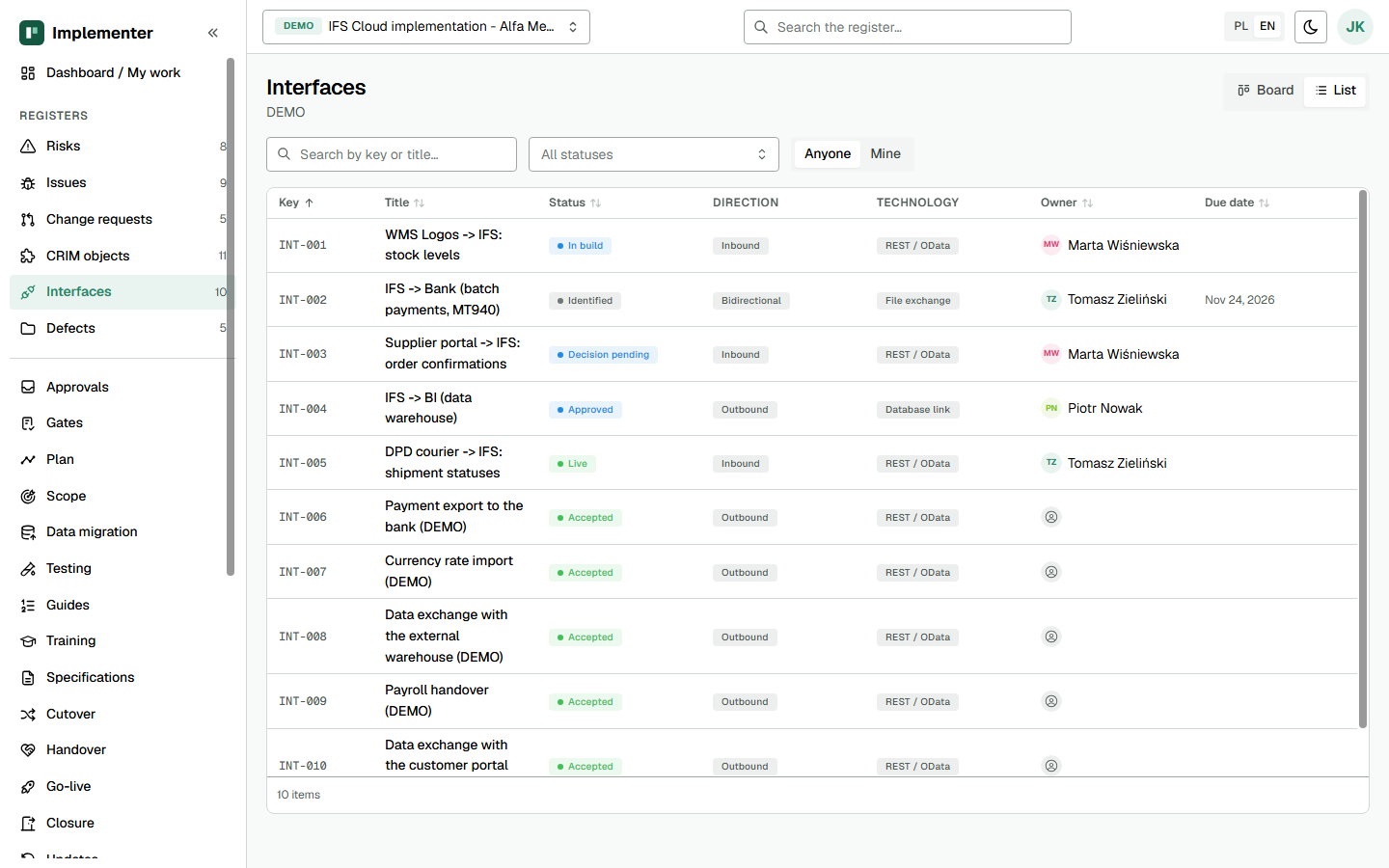
The interface register in list view with status, direction, technology and owner. Demo data.
How it maps to the template
| Template section | Implementer |
|---|---|
| Identification and flow (name, direction, systems, data) | Scope group on the interface |
| Mechanism and security (technology, access, frequency, volume) | Technical group; authentication in the Support group |
| Error handling | error_handling field |
| Legacy system and decision | Legacy group, decision recorded at Approve |
| Status and go-live | Lifecycle state, go-live date, test evidence |
| Credentials owner | Service account and permission set references, support owner |
| Scope of interfaces (IDK-02) | Scope status, counted on the scope statement |
Gate and approval behaviour
The register is evidence for four checklist items in the IDK-08 gates:
solution_confirmed.7, interface register lists every required interface.solution_established.4, interfaces built and tested end to end. The Testing readiness stage reads interface state and scenario coverage.go_live_authorised.12, production connections in place. The handover readiness blocks a production interface without an account, permission set or authentication.go_live_complete.6, interfaces live and legacy handled. The cutover readiness flags an interface to retire or replace a legacy one with no legacy action task.
A transition that lacks a required field opens a dialog asking for it. An action your role cannot take, or that is not allowed in the current state, appears greyed out with a tooltip giving the reason. Every transition and field change is written to the History tab.
Not in the application yet
- Application cutover actions per interface are tasks in the cutover plan, not fields on the interface.
- The application does not call the interface endpoints. The IFS API reference is text you enter.
- There is no generated register document; the register is the template.
Related
- Testing of interfaces: Implementer: Test Strategy (IDK-17) and SAT/ORT Test Script and Sign-off (IDK-18) cover how interfaces get tested.
- Kit template: IDK-13 Interface Register.
Independent product, not an official IFS document. IFS is a registered trademark of IFS.
